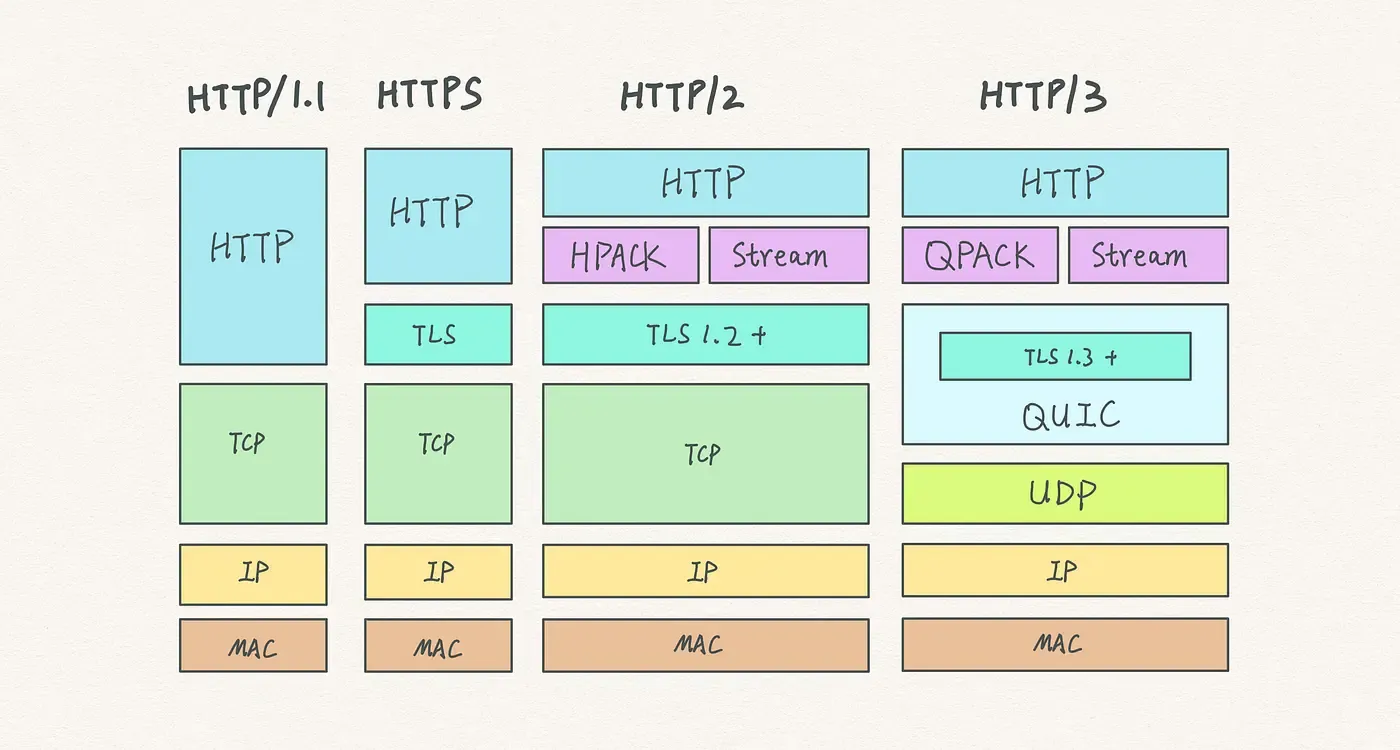
HTTP Protocol Evolution from a Performance Perspective
What HTTP is
HTTP (HyperText Transfer Protocol) is an application-layer protocol based on a request-response model. It transfers hypertext, such as HTML, between web browsers and web servers. As one of the foundational protocols of the internet, it defines the communication rules between clients and servers, allowing users to access web pages, images, videos, and many other network resources.
GET /zh-CN/docs/Glossary/CORS-safelisted_request_header HTTP/1.1
Host: developer.mozilla.org
User-Agent: Mozilla/5.0 (Macintosh; Intel Mac OS X 10.9; rv:50.0) Gecko/20100101 Firefox/50.0
Accept: text/html,application/xhtml+xml,application/xml;q=0.9,*/*;q=0.8
Accept-Language: zh-CN,zh;q=0.9
Accept-Encoding: gzip, deflate, br
Referer: https://developer.mozilla.org/zh-CN/docs/Glossary/CORS-safelisted_request_header

HTTP/1.1 200 OK
Connection: Keep-Alive
Content-Encoding: gzip
Content-Type: text/html; charset=utf-8
Date: Wed, 20 Jul 2016 10:55:30 GMT
Etag: "547fa7e369ef56031dd3bff2ace9fc0832eb251a"
Keep-Alive: timeout=5, max=1000
Last-Modified: Tue, 19 Jul 2016 00:59:33 GMT
Server: Apache
Transfer-Encoding: chunked
Vary: Cookie, Accept-Encoding

(content)
The evolution of HTTP
- HTTP/0.9: 1991
- HTTP/1.0: 1996
- HTTP/1.1: 1997
- HTTP/2: 2015
- HTTP/3: 2022
HTTP/1
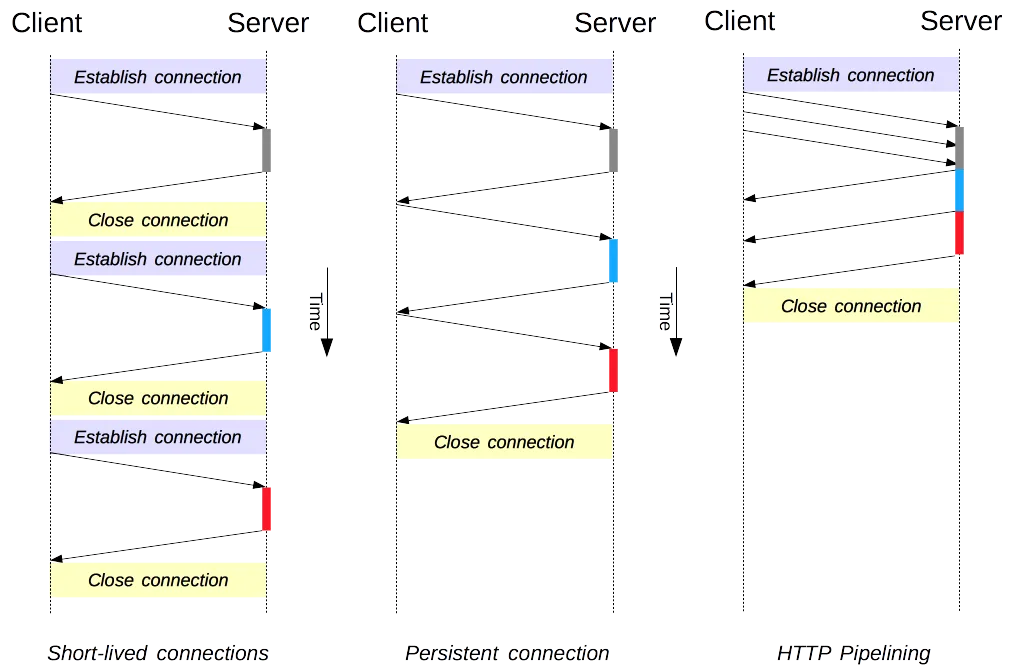
HTTP is built on top of TCP. In early versions, each request had to establish a new TCP connection, which introduced significant overhead. To improve performance, HTTP/1.1 introduced the following mechanisms:
- Keep-Alive: persistent connections that reuse the same TCP connection for multiple requests
- Pipeline: pipelining, which allows multiple requests to be sent before responses are received
- Chunked: chunked transfer encoding, which supports streaming response bodies
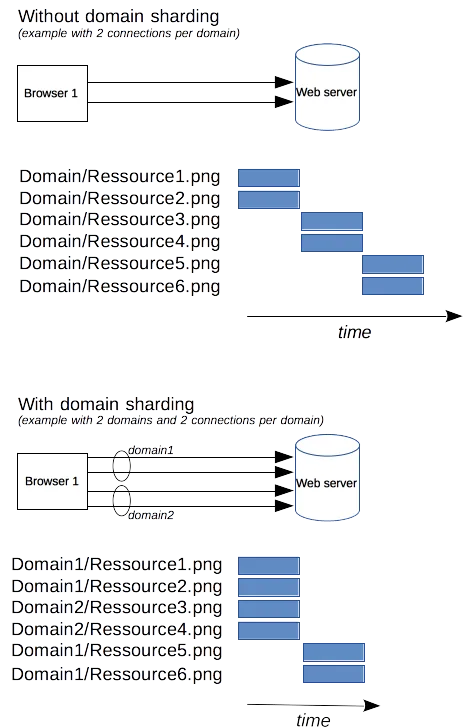
Domain sharding
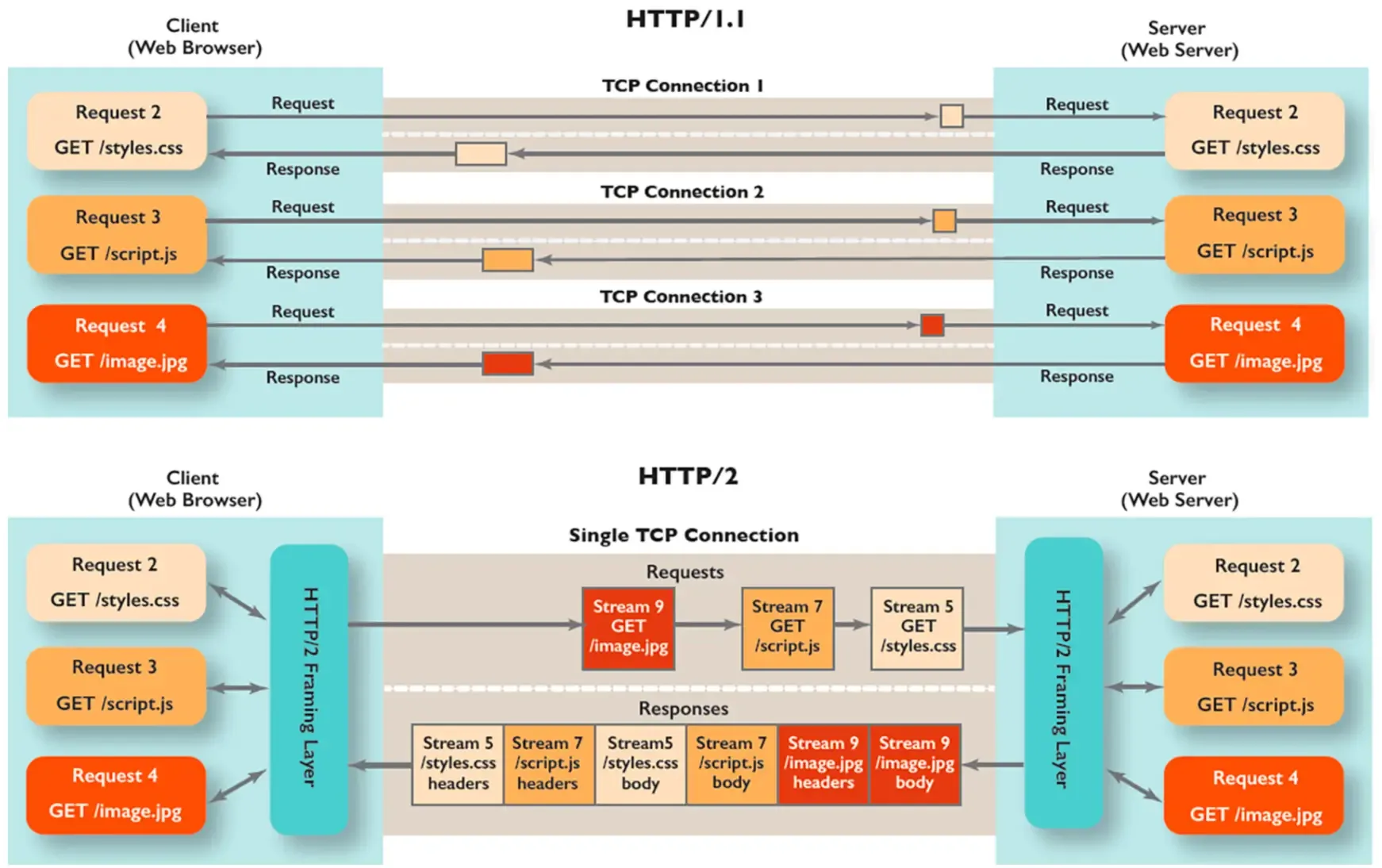
To improve web page loading performance, browsers usually allow at most six TCP connections per domain. To work around that limit, developers used to distribute page resources across multiple domains, gaining more concurrent connections.
Caching
HTTP cache control is an important part of web performance optimization. With a well-designed caching strategy, you can significantly reduce network requests, lower server load, and speed up page loading. Cache behavior is mainly controlled by HTTP headers, which define expiration and validation rules.
Common HTTP headers related to caching include:
- Cache-Control: defines cache strategy and lifetime, with multiple directives for flexible cache behavior
- Expires: specifies the resource expiration time; replaced by
Cache-Control: max-age - ETag: uniquely identifies a resource version and validates whether a cached copy is fresh
- Last-Modified: marks the resource’s last modification time and validates whether a cached copy is fresh
- Pragma: mainly used for backward-compatible cache control
- Age: indicates how long a response has been stored in cache, helping clients understand response freshness
Cache-Control
Cache-Control is the most important cache-control header introduced in HTTP/1.1. Its value is a set of directives that control request and response caching. Common directives include:
- public: the response may be cached by any cache, including clients and proxy servers
- private: the response is only for a single user and must not be stored by shared caches
- no-cache: always validate with the server before use, even when the cached copy appears fresh
- no-store: do not cache any response or request
- max-age=[seconds]: the maximum time, in seconds, during which the response is considered fresh and can be used directly without validation
- s-maxage=[seconds]: similar to
max-age, but only applies to shared caches such as CDNs - must-revalidate: after expiration, the cache must validate freshness with the server and cannot use a stale copy
- proxy-revalidate: similar to
must-revalidate, but only applies to proxy caches - immutable: indicates the resource will not change, so the cached response can be reused for a long time
Expires
Expires is an HTTP/1.0 header used to specify a resource expiration time. Its value is an absolute GMT timestamp. After that point, the cached copy is considered stale. Example:
Expires: Wed, 21 Oct 2023 07:28:00 GMTIn HTTP/1.1, Expires was replaced by Cache-Control: max-age, but many older systems still use it.
ETag
ETag (entity tag) is a string generated by the server and sent to the client to uniquely identify a resource version. On later requests, the client can send that value in the If-None-Match header, allowing the server to determine whether the resource has changed. Example:
ETag: "5d8c72a5edda8a:0"Server response rules:
- If the resource has not changed, return
304 Not Modifiedand let the client use the cached copy - If the resource has changed, return the new resource and a new
ETag
Last-Modified
Last-Modified indicates the resource’s last modification time. On later requests, the client can send that time in the If-Modified-Since header, allowing the server to determine whether the resource has changed. Example:
Last-Modified: Wed, 21 Oct 2023 07:28:00 GMTServer response rules:
- If the resource has not changed, return
304 Not Modifiedand let the client use the cached copy - If the resource has changed, return the new resource and a new
Last-Modifiedtime
Pragma
Pragma is an HTTP/1.0 cache-control header used mainly for backward compatibility. The common value is no-cache, meaning the client or intermediate cache must not cache the response:
Pragma: no-cacheIn HTTP/1.1, Pragma is often used together with Cache-Control to ensure compatibility.
Age
The Age header is added by cache servers. It indicates how long, in seconds, the response has been stored in cache, helping the client understand the response’s real freshness. Example:
Age: 60This means the response has existed in cache for 60 seconds.
Compression
Reducing transferred payload size effectively improves transfer performance. Compression involves two main headers:
- Accept-Encoding: the compression algorithms supported by the client
- Content-Encoding: the compression algorithm used for the response content
Common compression algorithms include:
- gzip
- deflate
- br (Brotli)
- zstd
Other optimization techniques
Beyond the mechanisms above, common performance optimizations include:
- Resource optimization: sprites, inlining small images as Base64, IconFont, and resource bundling
- Preloading:
preload,preconnect, and other preload or preconnect mechanisms - CDN: using a content delivery network to serve static resources from nearby locations and reduce latency
HTTP/2
HTTP/1.1’s head-of-line blocking, verbose headers, and single-connection limitations could no longer satisfy modern web applications’ needs for high performance and low latency. To address these bottlenecks, the IETF officially released HTTP/2 in 2015.
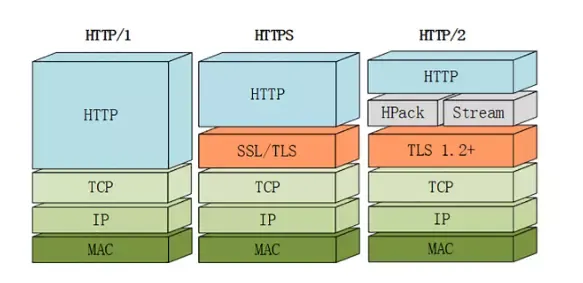
Key improvements
- Binary framing: HTTP/2 uses a binary framing layer to frame data, reducing parsing overhead and improving transfer efficiency
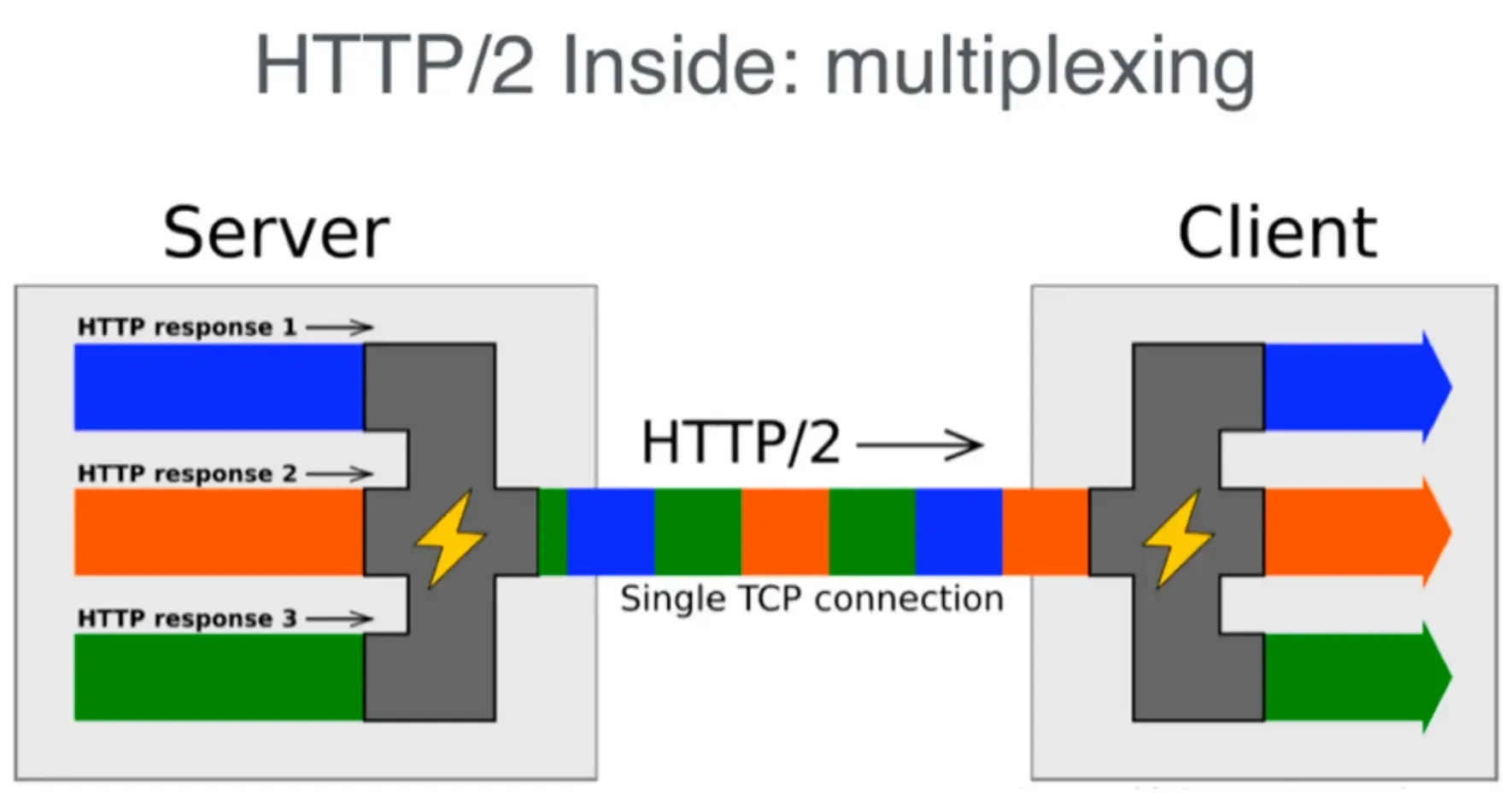
- Multiplexing: multiple requests and responses can be sent in parallel over a single TCP connection, eliminating application-layer head-of-line blocking
- Header compression: HPACK compresses headers and reduces transferred data
- Server push:
the server can proactively push resources to the client to reduce request latency(this feature is rarely used in practice)
HTTP/2 is based on binary framing and assigns an independent stream ID to each request, allowing requests to be sent out of order. As a result, web resources no longer need to be distributed across multiple domains. They can be requested concurrently from the same domain.
Demo

What HTTP/2 did not solve
Although HTTP/2 greatly improved performance, it is still based on TCP and therefore still has a TCP head-of-line blocking problem. HTTP/2 multiplexes streams over a single TCP connection. If packet loss or latency occurs at the underlying TCP layer, all parallel streams are affected.
HTTP/3
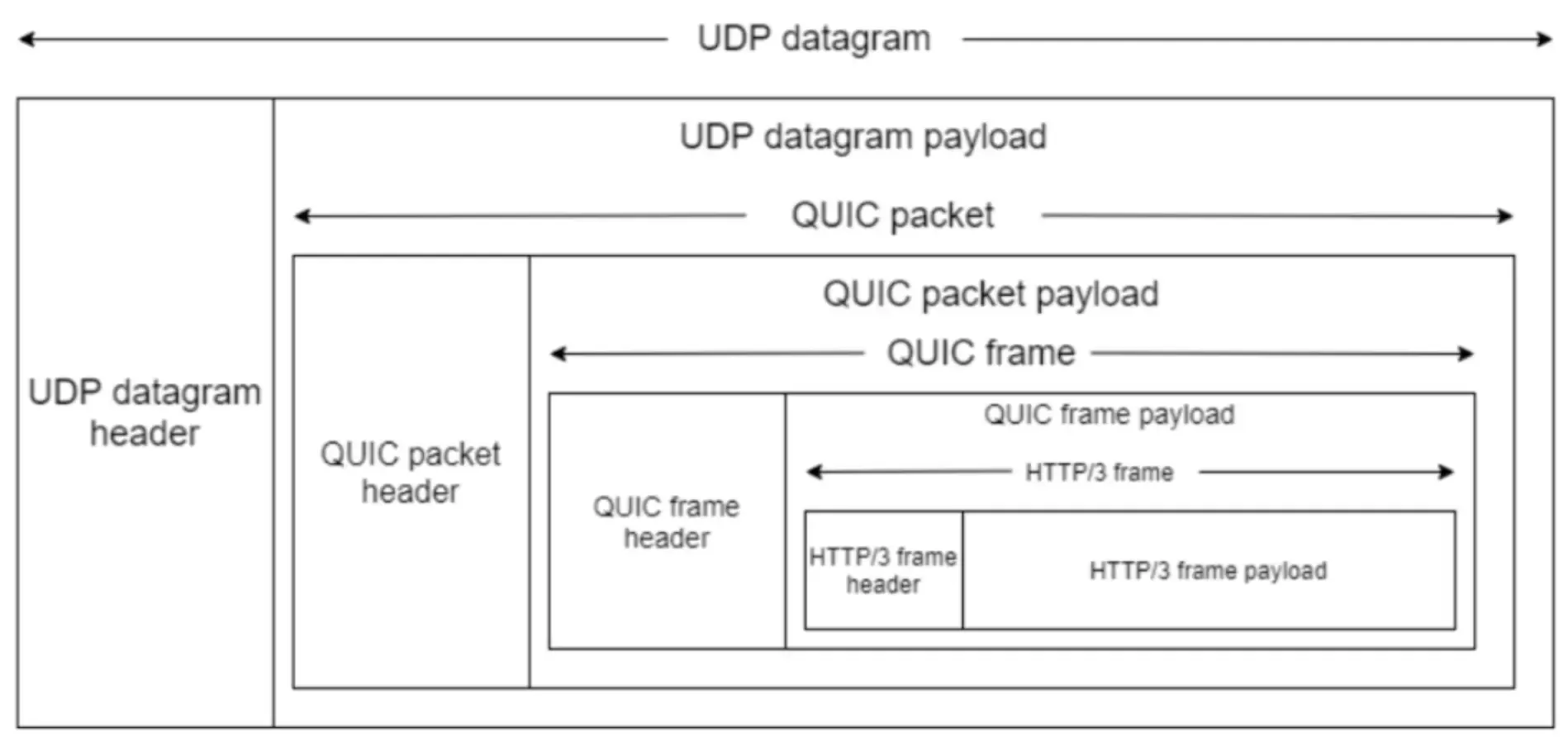
To fully address HTTP/2’s head-of-line blocking problem, HTTP/3 introduces QUIC, a UDP-based protocol. QUIC was designed from the start to reduce latency and improve transfer efficiency.
Key improvements in HTTP/3
- UDP-based QUIC protocol: QUIC uses UDP instead of TCP, avoiding TCP head-of-line blocking. Each QUIC stream is independent, so packet loss or latency in one stream does not affect other streams
- Fast handshake: QUIC integrates TLS into connection establishment. A first connection needs only one RTT, and later connections can use 0-RTT
- Improved congestion control: QUIC includes advanced congestion-control algorithms that use network resources more efficiently and improve transfer speed and stability
HTTP/3 uses Packet Number to identify packets and Stream ID to identify request streams.
Summary
Each evolution of HTTP has aimed to solve limitations in the previous version and improve transfer efficiency and user experience:
- HTTP/1.1 improved performance with persistent connections and pipelining
- HTTP/2 solved many performance bottlenecks with binary framing and multiplexing
- HTTP/3 introduces QUIC to further solve head-of-line blocking and significantly reduce latency