Android Cold Start Optimization with Baseline Profiles
Background
First-launch time is critical to Android app retention. At Google I/O 2022, Google recommended Baseline Profiles as a startup optimization approach. It is highly general and can be adopted by almost any Android app.
For that reason, our app can also try integrating this approach to further improve startup speed.
Principles
Core concepts
AOT
AOT, or Ahead-of-Time compilation, is a compilation technique that converts source code or intermediate code, such as bytecode, into machine code before the program runs. Unlike traditional JIT, or Just-in-Time compilation, AOT finishes compilation before execution and produces native machine code that can run directly on the target platform.
The main advantage of AOT is better runtime performance and lower startup time. Because the code has already been compiled into machine code, the runtime no longer needs to interpret or compile it during execution, reducing execution cost. This matters especially for applications that need fast startup and responsiveness, such as mobile apps and embedded systems.
Another advantage is that AOT can perform more optimization because the compiler can analyze and optimize the whole program at compile time. This kind of static optimization can improve execution efficiency and apply target-platform-specific optimizations for even better performance.
AOT also has limitations. Because code is fixed at compile time, it cannot be dynamically optimized based on runtime context. Some dynamic features, such as reflection or dynamic code generation, may not be fully optimized. AOT also requires extra compilation time and storage.
JIT
JIT, or Just-in-Time compilation, is a compilation technique that dynamically converts source code or intermediate code, such as bytecode, into machine code while the program is running. Unlike AOT, JIT compiles during execution and compiles code fragments into machine code as needed.
ART
ART, or Android Runtime, is the runtime environment in Android. It was introduced in Android 5.0, Lollipop, replacing the earlier Dalvik VM. ART aims to provide higher performance, lower memory usage, and better app responsiveness.
Unlike Dalvik, ART uses AOT compilation. When an app is installed, ART converts the app’s bytecode into native machine code and stores it on the device so it can be executed directly at runtime. This ahead-of-time compilation removes the JIT overhead used by Dalvik and improves app startup time and execution performance.
ART also introduced several optimizations, such as more efficient garbage collection, method inlining, loop optimization, and escape analysis. Another important feature is multi-architecture support: ART can generate native machine code for the device architecture, such as ARM, x86, or MIPS.
Baseline Profile
A Baseline Profile is a list of classes and methods in an APK that Android Runtime, ART, uses to precompile critical paths into machine code during app installation. It is a form of profile-guided optimization, or PGO, that helps apps improve startup, reduce jank, and improve performance, which improves user experience.
JVM
The JVM hides operating-system-specific details, allowing Java programs to generate bytecode that runs on the Java Virtual Machine and therefore run across multiple platforms without modification. When the JVM executes bytecode, it eventually interprets the bytecode into machine instructions for the current platform. This happens in user space.
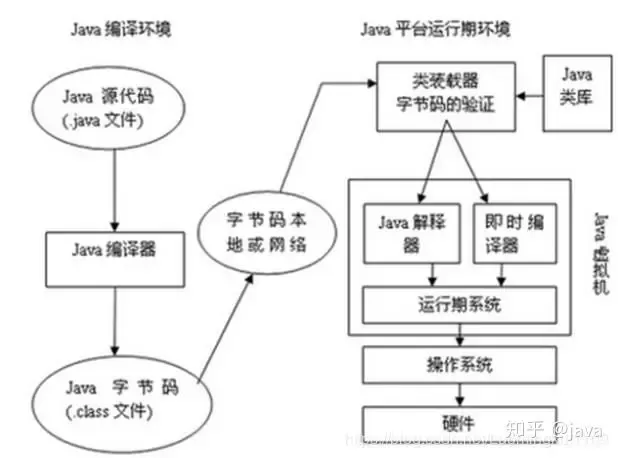
- Java source file -> compiler -> bytecode file
- Bytecode file -> JVM -> machine code
.oat files
An .oat file is an Android file format that contains precompiled machine code for an app or library. It improves startup speed and execution efficiency.
.oat files are generated by ART when an app is installed or first run. ART optimizes and compiles the app bytecode, then generates the corresponding .oat file. On later runs, ART can load and execute machine code from the .oat file directly, without parsing and compiling the bytecode again.
.oat files are usually associated with APK files. When an app is installed or first run, ART generates the corresponding .oat file from bytecode in the APK and stores it in a system directory on the device. The .oat file format and storage location can differ across devices and Android versions. ART manages .oat files automatically, so developers do not need to operate on them directly.
App build and runtime flow
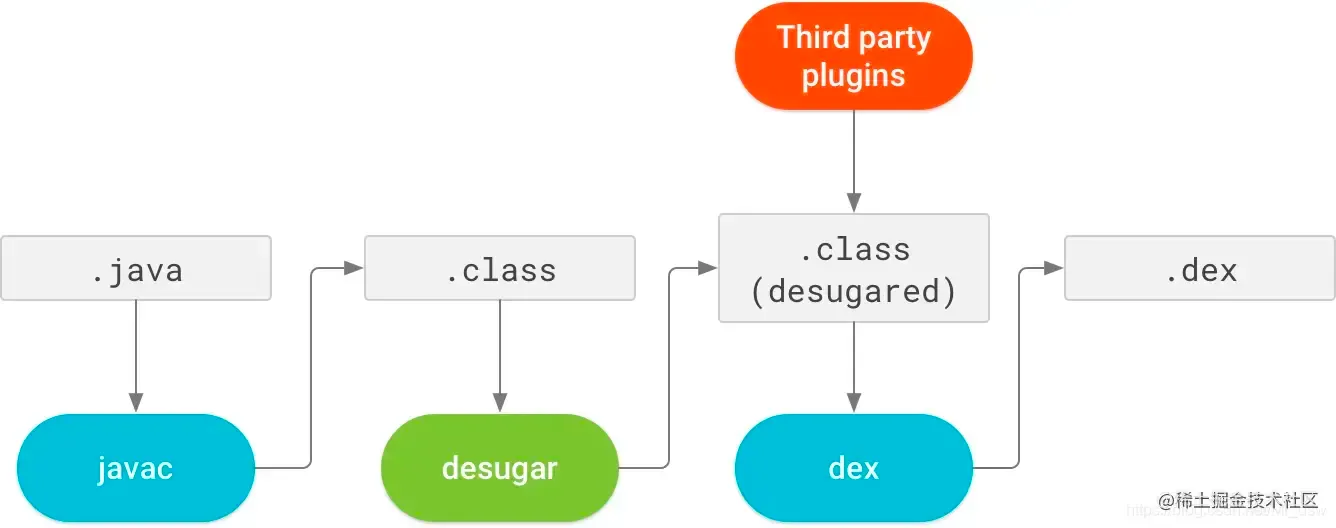
Build flow
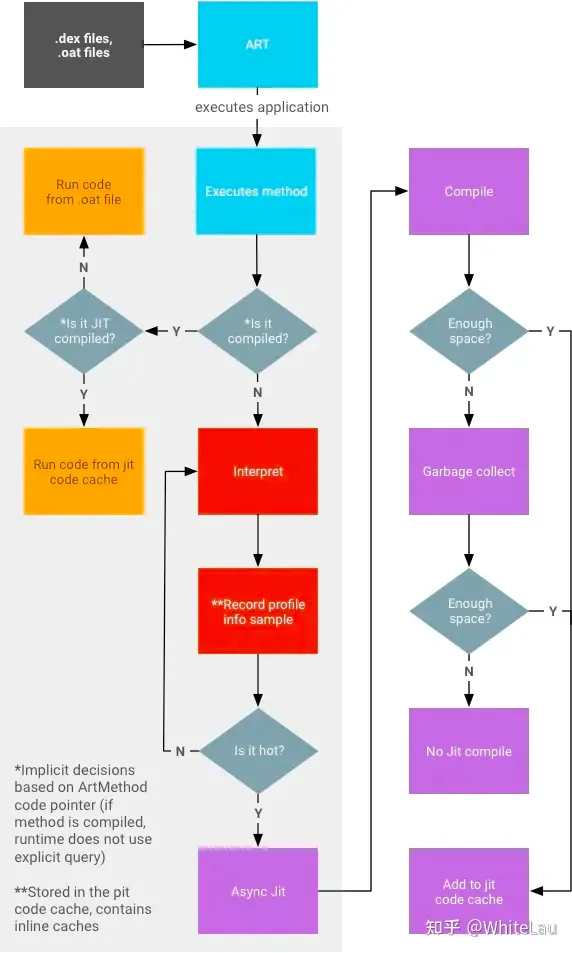
Runtime flow
- Write Java or Kotlin code: Use Java or Kotlin to implement app logic and features.
- Compile and build: Use Android Studio or another IDE to compile the code into bytecode and generate an APK containing resources and bytecode.
- Install the app: Install the APK on an Android device. The installation process extracts the APK and copies files to the device filesystem.
- Android Runtime, ART: The app runs inside ART, which loads and executes bytecode.
- Class loading and verification: ART loads and verifies classes before running them, ensuring that the bytecode complies with JVM rules and Android system requirements.
- Bytecode interpretation and compilation: ART uses an interpreter to convert bytecode into machine code for execution. During runtime, ART also uses JIT to compile hot code into native machine code for better execution efficiency.
Behavior across Android versions
Different Android versions use different app compilation approaches, each with its own performance tradeoffs. Baseline Profiles provide a profile suitable for all installs and improve on earlier compilation methods.
| Android version | Compilation method | Optimization method |
|---|---|---|
| Android 5, API 21, to Android 6, API 23 | Full AOT | The entire app is optimized during installation. This increases user wait time, RAM and disk usage, and code loading time from disk, which can increase cold start time. |
| Android 7, API 24, to Android 8.1, API 27 | Partial AOT with Baseline Profiles | Baseline Profiles are installed by androidx.profileinstaller on first app run. ART can add more profile rules during app usage and compile those rules while the device is idle, improving disk usage and reducing loading time. |
| Android 9, API 28, and later | Partial AOT with Baseline Profiles plus cloud profiles | During app installation, Play uses Baseline Profiles and cloud profiles, when available, to optimize the APK. After install, ART profiles are uploaded to Play, aggregated, and provided as cloud profiles for later installs or updates by other users. |
On Android 5.0 and 6.0, code is fully AOT-compiled during installation. AOT improves performance, but it increases install time and disk usage.
On Android 7.0 and later, Android supports a hybrid compilation mode where JIT and AOT coexist. ART records hot code at runtime and stores it under /data/misc/profiles/cur/0/packageName/primary.prof, then performs AOT compilation for that hot code. This is more flexible than full AOT compilation.
How Baseline Profiles work
Hybrid compilation
Android needs to collect hot code during execution, generate a .prof file, and then run AOT compilation based on that .prof file when the system is idle. This balances install speed and runtime speed. For device manufacturers, it also affects first boot and post-OTA boot speed; users who used Android 5.x or 6.x may remember the slow “optimizing apps” process after OTA updates.
But hybrid compilation has one obvious downside: the app’s first run must rely on JIT compilation, so startup is relatively slow.
Google’s Baseline Profiles idea is simple: let developers collect hot code during development, so AOT compilation can happen before users ever open the app.
How Baseline Profiles operate
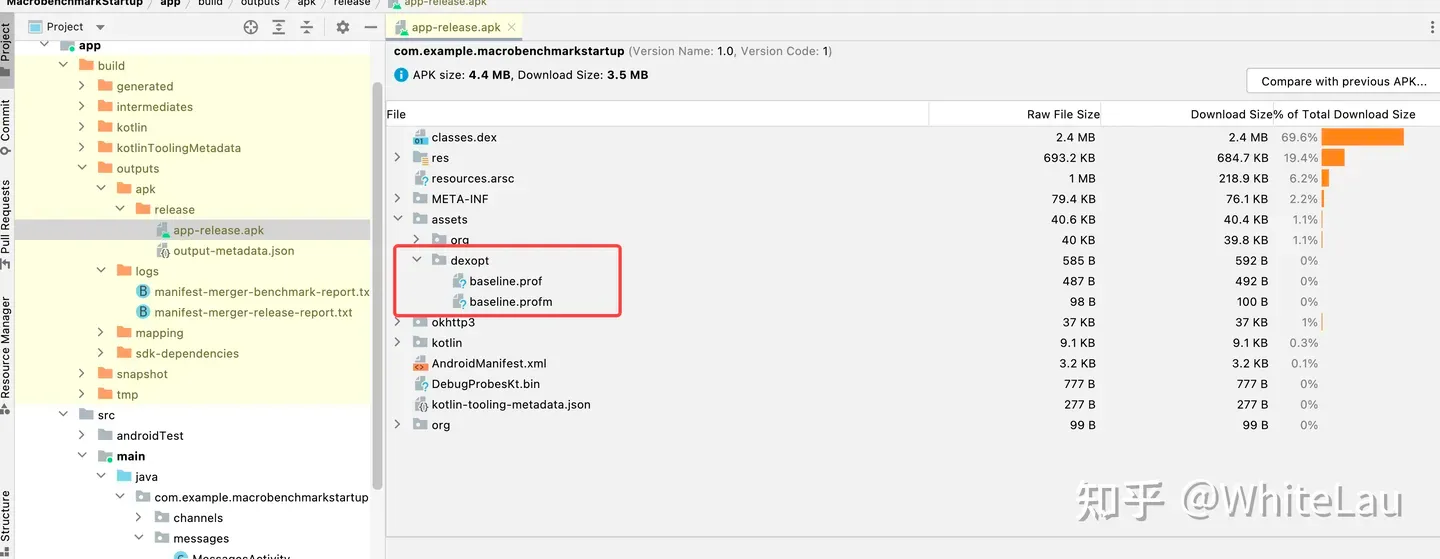
Profile rules are compiled into binary form in assets/dexopt/baseline.prof inside the APK.
During app installation, ART ahead-of-time compiles the methods in the profile to improve their execution speed. If the profile includes methods used during startup or frame rendering, users get faster startup and less jank.
When developing an app or library, define a Baseline Profile that covers hot paths where rendering time or latency matters in critical user journeys, such as startup, transitions, or scrolling. The Baseline Profile is then shipped directly to users with the APK.
Summary: Google’s approach is to let developers collect hot-code rules ahead of time, package those rules with the app, and place them under /data/misc/profiles/cur/0/. The overall process has two steps: collect hot-code rules, then store those rules in the expected directory.
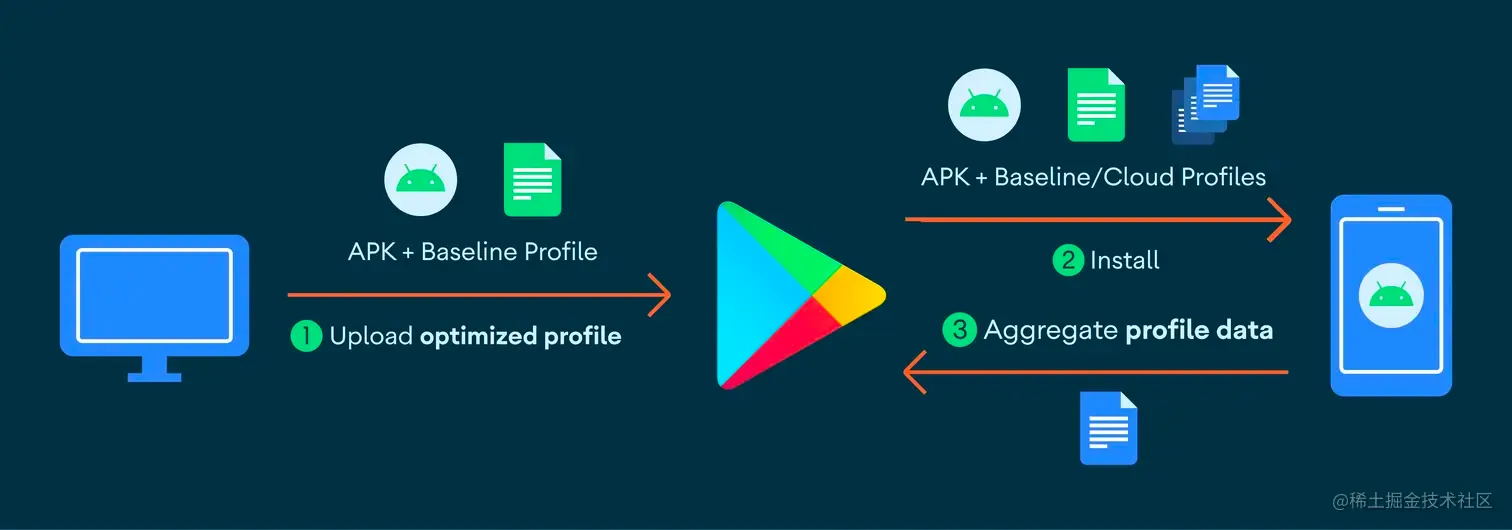
With Google Play
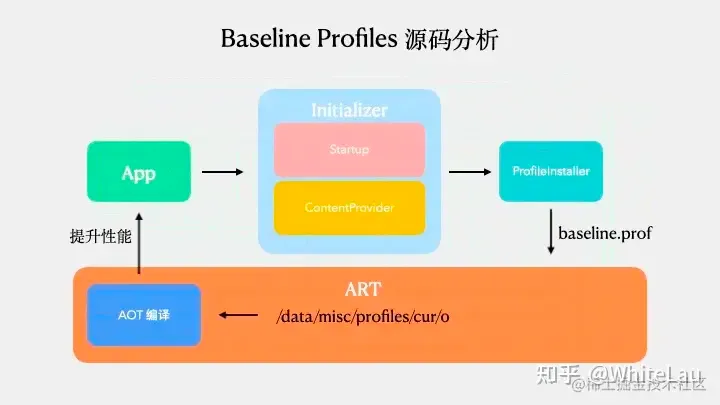
Without Google Play
After the project builds an APK, a dexopt folder appears under assets. It contains baseline.prof and baseline.profm, as shown below:

Precompilation timing
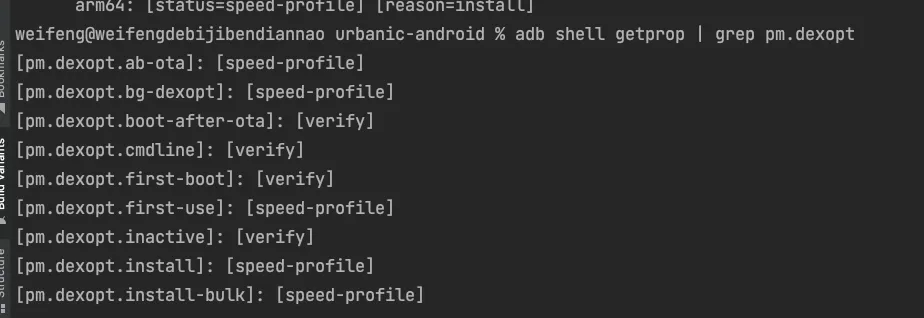
- ab-ota: Short for Android Bootloader Over-The-Air. It refers to updating an Android device bootloader through a wireless update, usually an OTA update.
- bg-dexopt: The Android background process that performs DEX optimization.
- Install app: During installation.
- first-use: During first use.
Generating the Baseline Profile
Principle
Use instrumentation to record the full path from app launch to home page display.
Build environment

Code structure
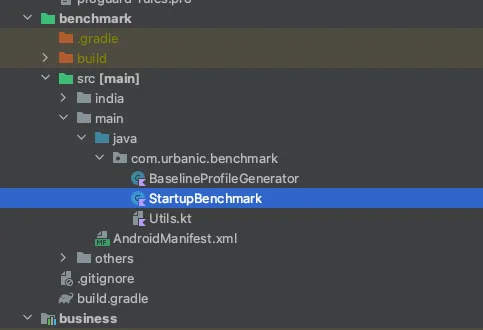
package com.urbanic.benchmark

import androidx.benchmark.macro.junit4.BaselineProfileRule
import androidx.test.ext.junit.runners.AndroidJUnit4
import org.junit.Rule
import org.junit.Test
import org.junit.runner.RunWith

@RunWith(AndroidJUnit4::class)
class BaselineProfileGenerator {

    @get:Rule
    val rule = BaselineProfileRule()

    @Test
    fun generateBaselineProfile() {
        rule.collectBaselineProfile(PACKAGE_NAME) {
            pressHome()
            startActivityAndWait()

            // val intent = Intent(HOME_ACTIVITY_ACTION)
            // intent.`package` = packageName
            // intent.component = ComponentName(packageName, HOME_ACTIVITY_PATH)
            // startActivityAndWait(intent)
            // device.wait(Until.hasObject(By.clazz(HOME_ACTIVITY_PATH)), 5_000)
            // device.wait(Until.hasObject(By.res(packageName + ":id/content_img")), 5_000)
            // device.wait(Until.hasObject(By.res(packageName + ":id/include_navigation_bottom")), 5_000)

        }
    }

    internal companion object {
        const val HOME_ACTIVITY_PATH = "com.urbanic.home.view.NewBrandHomeActivity"
        const val HOME_ACTIVITY_ACTION = "urbanic.intent.action.benchmark"
    }
}
Build command
The command for generating the Baseline Profile is:
:benchmark:PixelXLApi33IndiaBenchmarkAndroidTest --rerun-tasks -P android.testInstrumentationRunnerArguments.class=com.urbanic.benchmark.BaselineProfileGeneratorParameter notes:
- benchmark: The module name.
- PixelXLApi33IndiaBenchmarkAndroidTest: The device configuration used to run the mock code.
- com.urbanic.benchmark.BaselineProfileGenerator: The test class that generates the Baseline Profile.
Understanding the baseline-prof.txt file
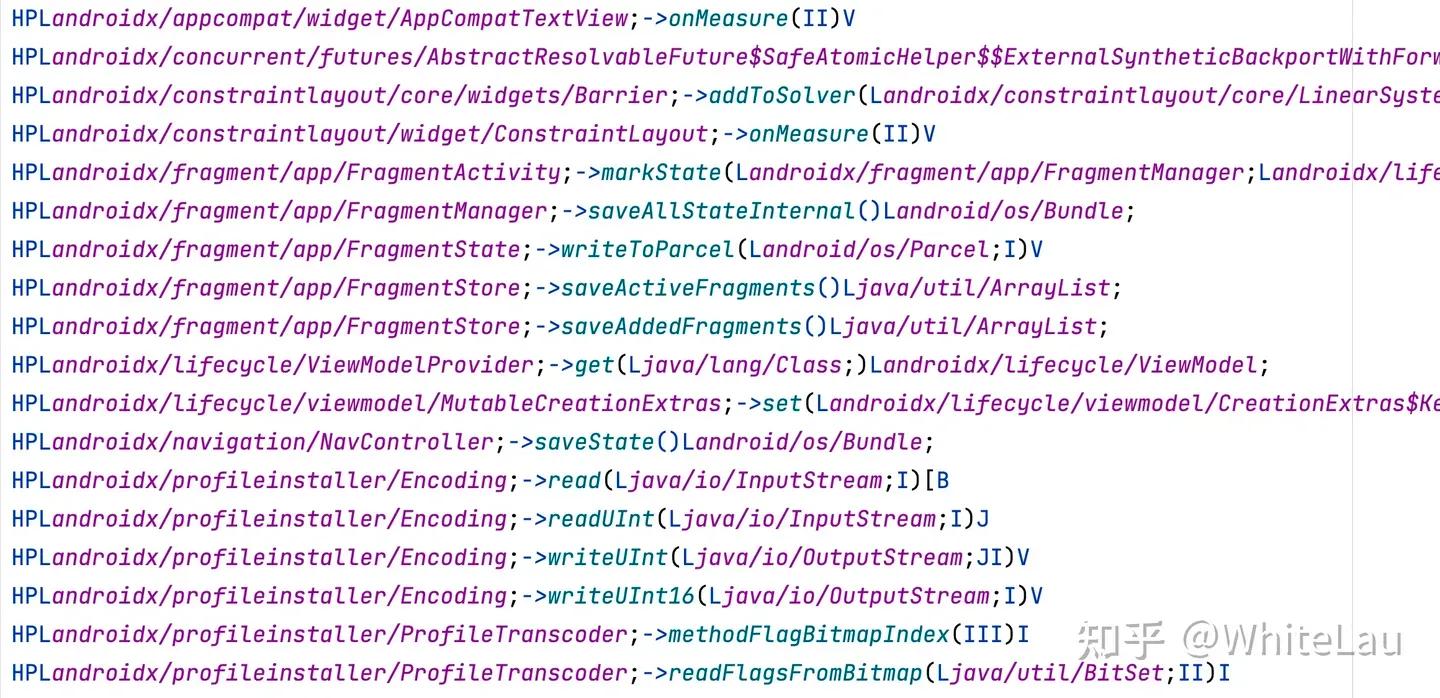
One or more of H, S, and P indicate how the corresponding method is marked for startup behavior:
- H, Hot: The method is called many times throughout the app lifecycle.
- S, Startup: The method is called during startup.
- P, Post Startup: The method is called after startup.
Notes
Keep the following points in mind when creating Baseline Profiles:
- Android 5 to Android 6, API 21 and 23, already AOT-compile APKs during installation, so Baseline Profiles have no effect there.
- Debuggable apps are never AOT-compiled, which helps with troubleshooting.
- The rules file must be named
baseline-prof.txtand placed in the root of the main source set, at the same level asAndroidManifest.xml. - These files are used only with Android Gradle Plugin
7.1.0-alpha05or later, Android Studio Bumblebee Canary 5. - Bazel currently does not support reading Baseline Profiles or merging them into APKs.
- A compressed Baseline Profile must not exceed 1.5 MB, so libraries and apps should define a small set of rules that maximizes impact.
- If rules are too broad and too much code is compiled, disk access increases and startup can become slower. Always measure the profile’s performance.
Integrating the Baseline Profile
Add the ProfileInstaller dependency
dependencies {
    //...
    implementation "androidx.profileinstaller:profileinstaller:1.2.0"
}
Add the baseline-prof file
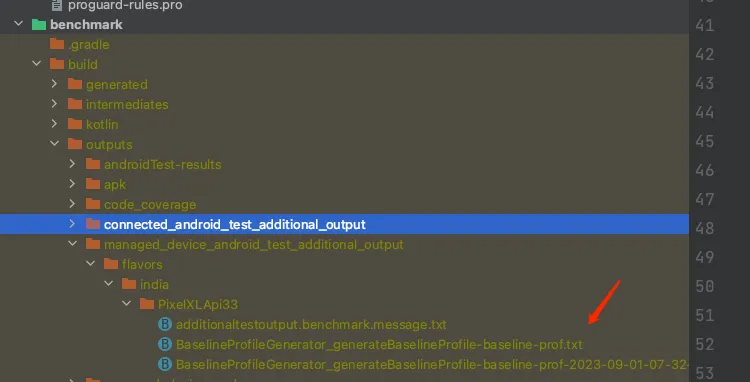
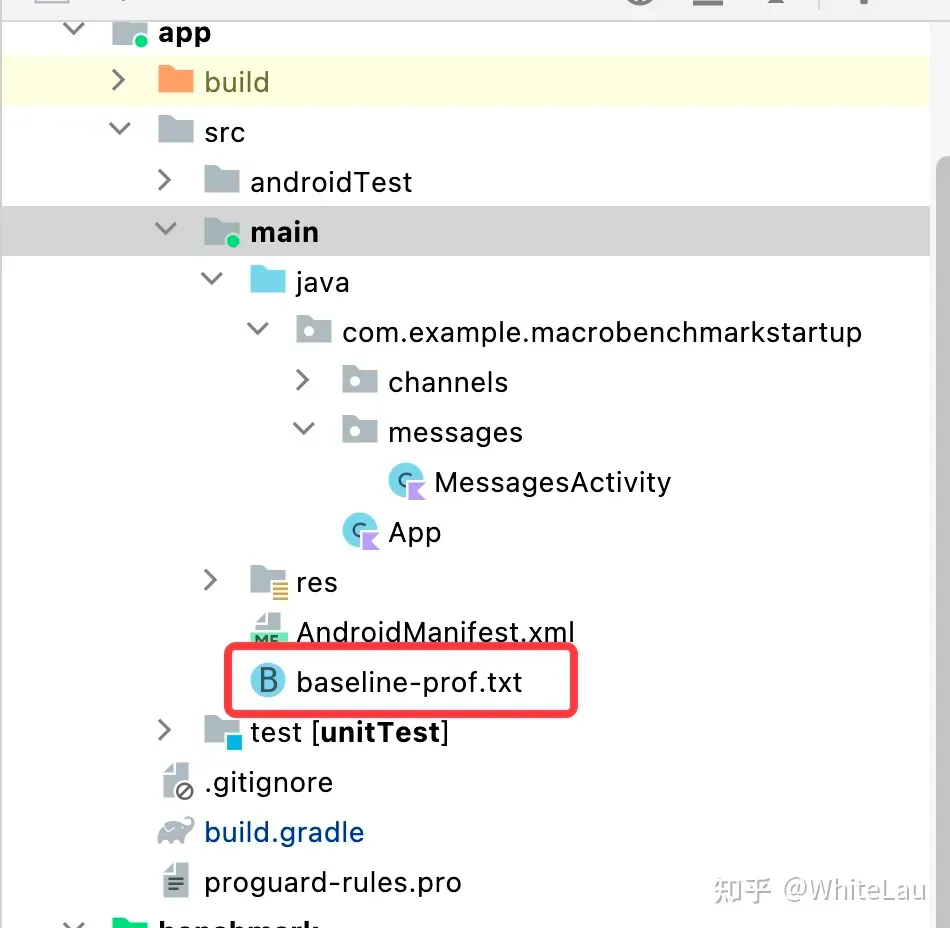
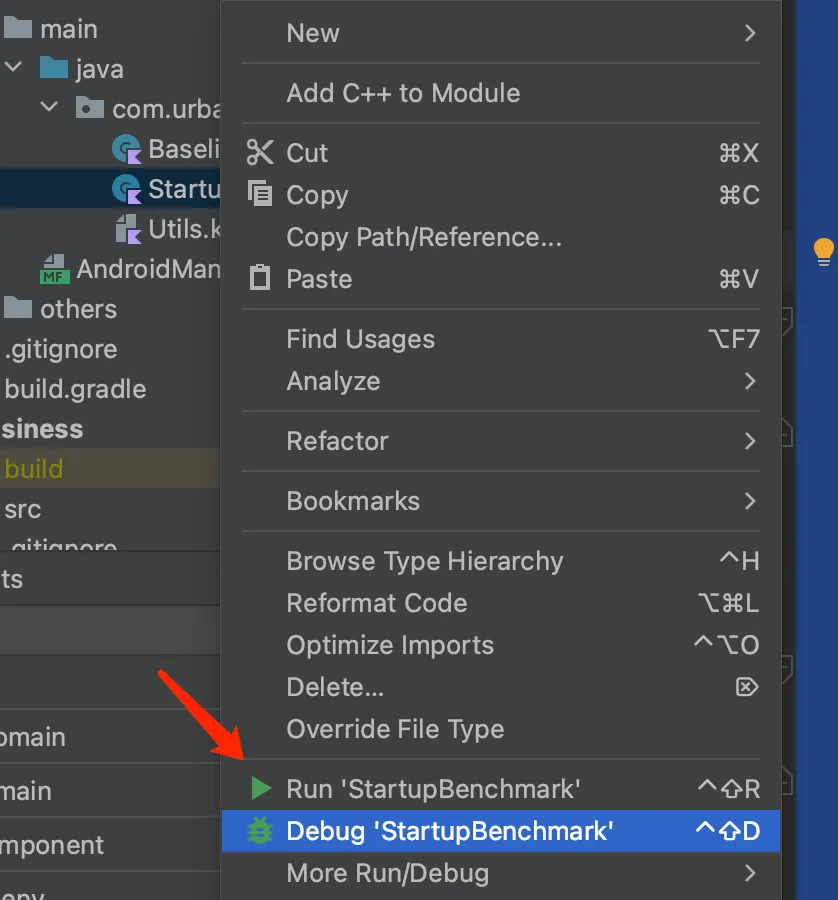
Automated verification test
package com.urbanic.benchmark

import androidx.benchmark.macro.CompilationMode
import androidx.benchmark.macro.StartupMode
import androidx.benchmark.macro.StartupTimingLegacyMetric
import androidx.benchmark.macro.junit4.MacrobenchmarkRule
import androidx.test.ext.junit.runners.AndroidJUnit4
import org.junit.Rule
import org.junit.Test
import org.junit.runner.RunWith

@RunWith(AndroidJUnit4::class)
class StartupBenchmark {
    @get:Rule
    val benchmarkRule = MacrobenchmarkRule()

    @Test
    fun startupNoCompilation() {
        startup(CompilationMode.None())
    }

    @Test
    fun startupBaselineProfile() {
        startup(CompilationMode.Partial())
    }

    // @Test
    // fun startupFullCompilation() {
    //     startup(CompilationMode.Full())
    // }

    private fun startup(compilationMode: CompilationMode) {
        benchmarkRule.measureRepeated(packageName = PACKAGE_NAME,
            metrics = listOf(StartupTimingLegacyMetric()),
            iterations = 15,
            startupMode = StartupMode.COLD,
            compilationMode = compilationMode,
            setupBlock = { pressHome() }) {
            startActivityAndWait()
            // device.wait(Until.hasObject(By.res(packageName + ":id/content_img")), 5_000)
            // device.wait(Until.hasObject(By.res(packageName + ":id/include_navigation_bottom")), 5_000)
        }
    }
}
Test results
Startup time
Test environment and definitions
- min: The minimum value in a data set.
- max: The maximum value in a data set.
- median: The median value.
- timeToInitialDisplayMs: The time from the system receiving the launch intent to the target Activity rendering its first frame.
Test device: Xiaomi 10, Android 13.
User-available time
SM-A5070, Android 11, API 30.
Measured range: from Application.attachBaseContext to HomeActivity.onResume.
Result
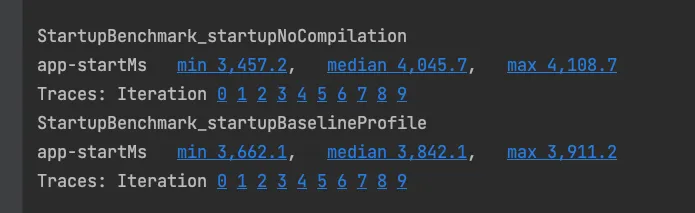
Conclusions
- The better the phone performance, the less visible the optimization effect.
- The improvement did not reach the 20%+ described in Google’s official documentation. In our tests, the better cases were around 10%.
- The Baseline Profile tells the system which code should be precompiled into binary code. The logic is similar in most cases across the international and India environments, so packaging both environments with the same profile should have little impact.
Post-launch projection
The overall optimization should help, but the effect is unlikely to be dramatic. We expect it to be below 10%, based on three points:
1. Experiment data

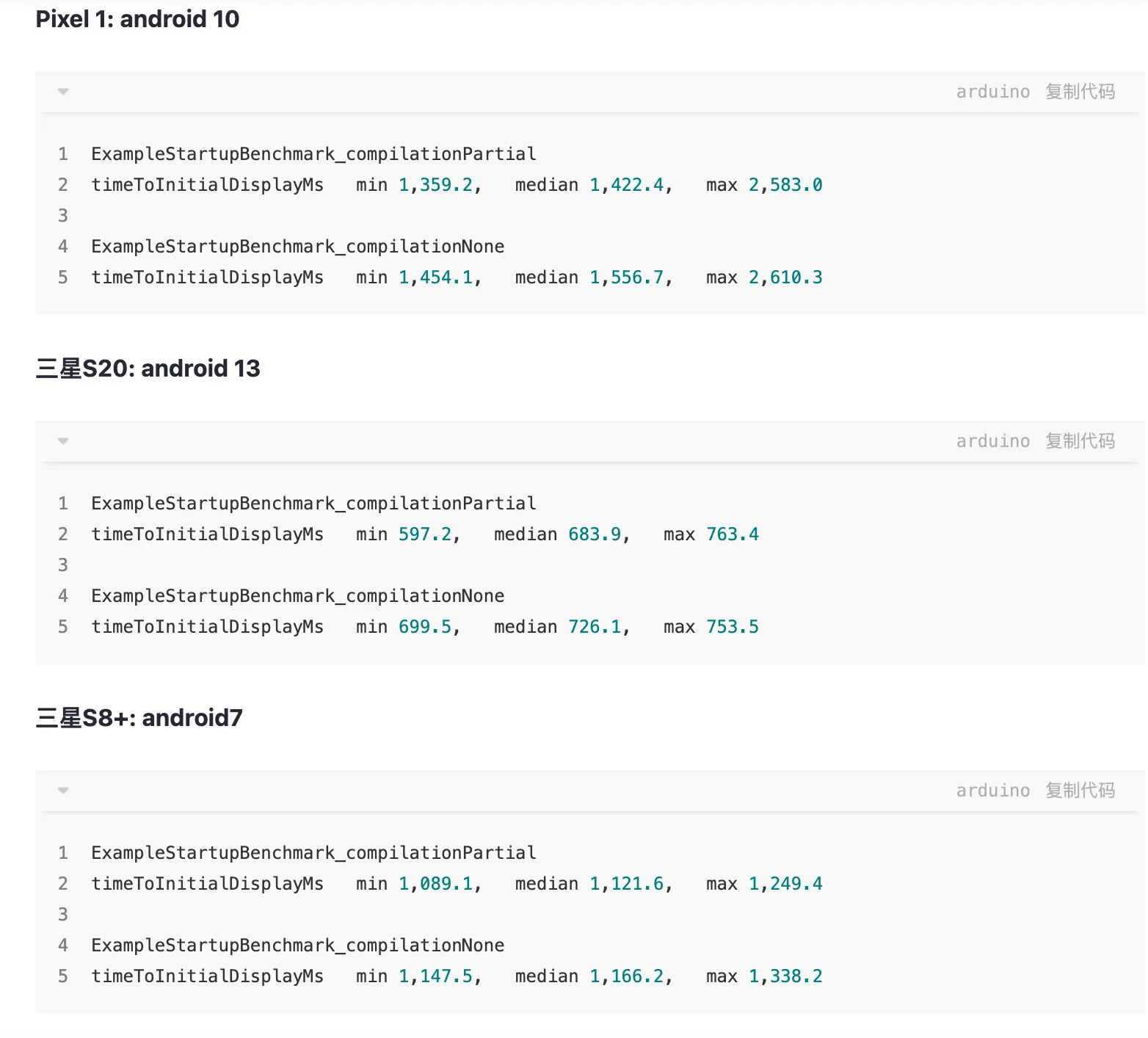
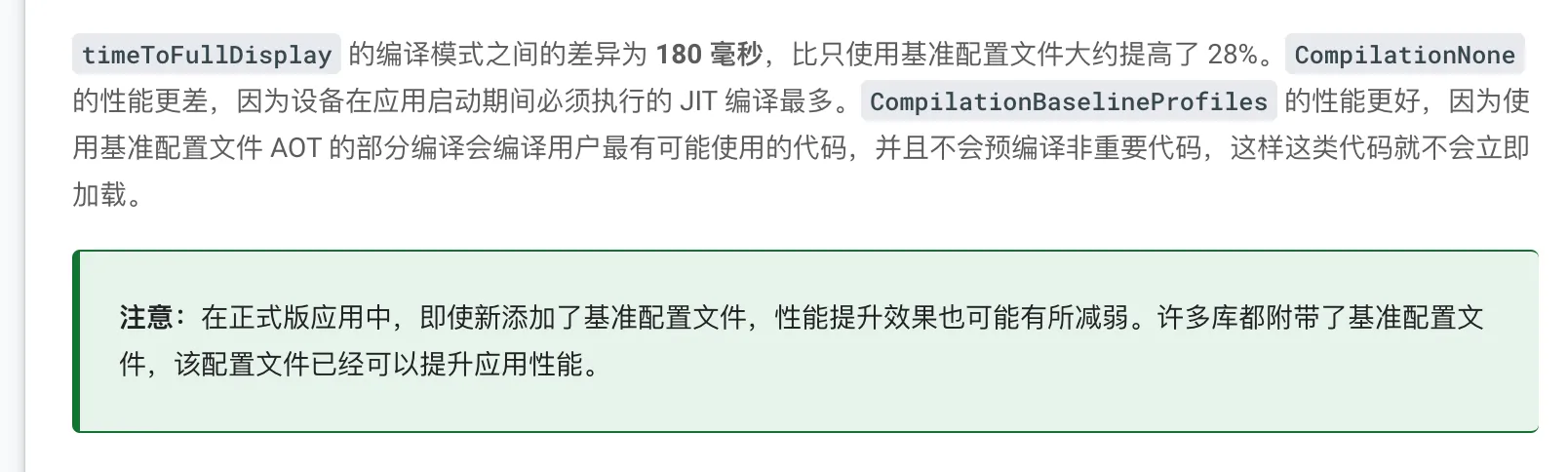
Based on measurements from other developers, the optimization effect usually does not reach Google’s promoted 20%. It is generally within 10%, which is close to our current test result.
2. Third-party libraries are already optimized
dexopt is the compiled Baseline Profile.

The dexopt file without adding the Baseline Profile:

The dexopt file after adding the Baseline Profile:
The baseline.prof file when baseline-prof.txt has not been added:
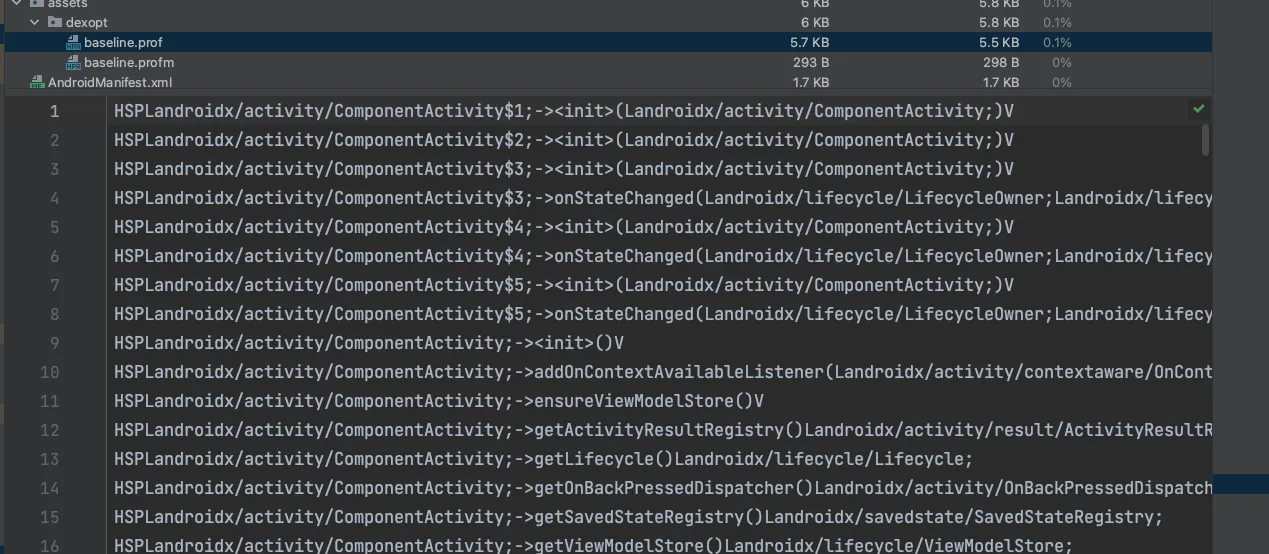
Many entries are methods from Android system libraries.
3. Existing hot code
When users have used the app for a long time, the hot-code file produced by the system overlaps heavily with the hot code in the Baseline Profile, so the optimization effect becomes less obvious.
Issues during development
1. How can the generated Baseline Profile be automatically added to the app directory?
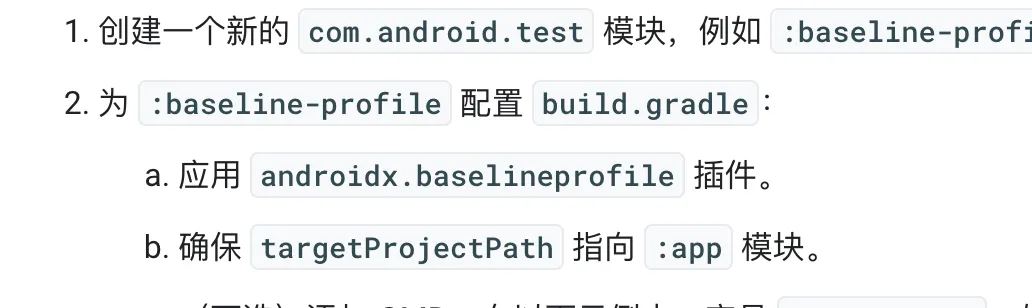
The corresponding androidx.baselineprofile plugin was not found, and searching the shared libraries did not return results.
2. How can different Baseline Profiles be generated and applied for multiple productFlavors?
After configuration, two Gradle tasks are generated:

After the task finishes, it generates two different baselineProfile files, each corresponding to a different flavor package. They need to be added manually, and the team must consider how to integrate them into the existing packaging process.
Phase 1: manually build productFlavor artifacts for the India and international environments
Place the India and international artifacts under the India and Others directories respectively:
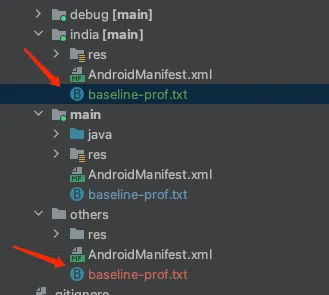
During packaging, use a custom script to copy the india or others file into the main project. This allows each flavor environment to package with its own Baseline Profile and integrates with the existing Starlink packaging flow:
if (isPackOtherApk()) {
    task copyTxtFile(type: Copy) {
        from '../app/src/others/baseline-prof.txt'
        into '../app/src/main/'
    }
    preBuild.dependsOn(copyTxtFile)
} else if (isPackIndiaApk()) {
    task copyTxtFile(type: Copy) {
        from '../app/src/india/baseline-prof.txt'
        into '../app/src/main/'
    }
    preBuild.dependsOn(copyTxtFile)
}
We considered putting the file under assets, but files under that directory are not deleted after packaging, which increases package size. That directory is also often added to .gitignore, making it impossible to track with Git. We also considered the raw directory, but it has naming restrictions, and the original artifact is still not deleted after packaging, so it has the same package-size issue.
Phase 2: full process automation, not yet implemented.
3. What is the difference between systemImageSource = “aosp” and systemImageSource = “google”?
- Google API: A set of APIs provided by Google for developers to integrate with Google services and platforms, including Google Maps, Drive, Calendar, Analytics, Cloud Vision, and more.
- AOSP: Android Open Source Project, the open-source Android codebase. Another reason to use AOSP is that it is easier to root.

4. How can the before-and-after effect be verified without automated tests?
Manually measuring app improvement
First, measure the startup time of the unoptimized app as a baseline:
PACKAGE_NAME=com.example.app

# Force Stop App
adb shell am force-stop $PACKAGE_NAME
# Reset compiled state
adb shell cmd package compile --reset $PACKAGE_NAME

# Measure App startup
# This corresponds to `Time to initial display` metric
# For additional info https://developer.android.com/topic/performance/vitals/launch-time#time-initial
adb shell am start-activity -W -n $PACKAGE_NAME/.ExampleActivity \
 | grep "TotalTime"
Next, sideload the Baseline Profile.
Note: This workflow only applies to Android 9, API 28, through Android 11, API 30.
# Unzip the Release APK first
unzip release.apk

# Create a ZIP archive
# Note: The name should match the name of the APK
# Note: Copy baseline.prof{m} and rename it to primary.prof{m}
cp assets/dexopt/baseline.prof primary.prof
cp assets/dexopt/baseline.profm primary.profm

# Create an archive
zip -r release.dm primary.prof primary.profm

# Confirm that release.dm only contains the two profile files:
unzip -l release.dm
# Archive:  release.dm
#   Length      Date    Time    Name
# ---------  ---------- -----   ----
#      3885  1980-12-31 17:01   primary.prof
#      1024  1980-12-31 17:01   primary.profm
# ---------                     -------
#                               2 files

# Install APK + Profile together
adb install-multiple release.apk release.dm
Verify whether the package was optimized at install time:
# Check dexopt state
adb shell dumpsys package dexopt | grep -A 1 $PACKAGE_NAME
The output should indicate that the package was compiled:
[com.example.app]
  path: /data/app/~~YvNxUxuP2e5xA6EGtM5i9A==/com.example.app-zQ0tkJN8tDrEZXTlrDUSBg==/base.apk
  arm64: [status=speed-profile] [reason=install-dm]
Now measure app startup as before, but do not reset the package compilation state:
# Force Stop App
adb shell am force-stop $PACKAGE_NAME

# Measure App startup
adb shell am start-activity -W -n $PACKAGE_NAME/.ExampleActivity \
 | grep "TotalTime"
5. Size limit and handling for generated Baseline Profiles

The image above shows the compiled file size requirement. In practice, a source file of around 3 MB compiles to only about 30 KB, so it generally does not exceed the limit.

6. Obfuscation-related issues
First, do not enable minifyEnabled when generating baseline-prof.txt, or configure separate rules to avoid obfuscation. Otherwise, the recorded hot code will be obfuscated code.
Baseline Profiles record paths for hot classes. Obfuscation changes class paths. So when generating the final release package, can Baseline Profiles still work correctly?
Most official documentation does not mention this point. In a related issue, a Google engineer replied:
Baseline profiles also participate in the obfuscation process, like classes; so this already works.
Reference: https://issuetracker.google.com/issues/235571073#comment2
Google confirmed that Baseline Profiles already work correctly with R8 optimization. Test verification showed that after enabling minifyEnabled, Macrobenchmark still produced better startup results.
7. In projects with Dynamic Feature Modules, related code is not packaged into the APK during benchmarking
Several tabs on our app home page are implemented with Dynamic Feature Modules. As a result, the package produced by the benchmark test does not include the related code, and the home page appears blank.
Related discussion: https://stackoverflow.com/questions/71706002/android-jetpack-baseline-profile-with-dynamic-feature-modules
Same issue here, it looks like when we run benchmark task, the task didn’t include the dynamic feature code into our application, basically it will use app bundle(aab) instead of apk. So if the class is not included in your base.apk, then it will throw a classnotfound exception
Reason: The Gradle command for benchmark testing is :benchmark:connectedIndiaBenchmarkAndroidTest. The final packaging command in its task chain is :app:packageIndiaBenchmark, and the APK produced by that command does not include Dynamic Feature Module artifacts. By contrast, :app:packageIndiaBenchmarkUniversalApk includes the Dynamic Feature Module code in the package.
Temporary workaround: After :app:packageIndiaBenchmark finishes, replace the benchmark artifact with the package produced by :app:packageIndiaBenchmarkUniversalApk. The accuracy and code quality of this workaround still need improvement. Google may provide an official solution later.
// Used during benchmark tests.
//    afterEvaluate {
//        tasks.named('packageIndiaBenchmark').get().doLast {
//            delete("/Users/weifeng/works/urbanic-android/app/build/intermediates/apk/india/benchmark/urbanic-v7.7.0.0-india-benchmark.apk")
//            copy {
//                from("/Users/weifeng/works/urbanic-android/app/build/outputs/apk_from_bundle/indiaRelease/urbanic-v7.7.0.0-india-release-universal.apk")
//                into("/Users/weifeng/works/urbanic-android/app/build/intermediates/apk/india/benchmark")
//                rename("urbanic-v7.7.0.0-india-release-universal.apk", "urbanic-v7.7.0.0-india-benchmark.apk")
//            }
//        }
//    }
8. Automated test issue
Our app shows a notification permission dialog. Once it appears, it sits at the top level of the view hierarchy and breaks ID-based automated test logic. Use allowNotifications() to dismiss the dialog:
fun MacrobenchmarkScope.allowNotifications() {
    if (SDK_INT >= TIRAMISU) {
        val command = "pm grant $packageName ${permission.POST_NOTIFICATIONS}"
        device.executeShellCommand(command)
    }
}

private fun startup(compilationMode: CompilationMode) {
    benchmarkRule.measureRepeated(packageName = PACKAGE_NAME,
        // metrics = listOf(TraceSectionMetric("app-start")),
        metrics = listOf(StartupTimingLegacyMetric()),
        iterations = 5,
        startupMode = StartupMode.COLD,
        compilationMode = compilationMode,
        setupBlock = {
            pressHome()
            allowNotifications()
        }) {
        startActivityAndWait()
        allowNotifications()
        device.wait(Until.hasObject(By.res("com.urbanic:id/include_navigation_bottom")), 5_000)
    }
}
Open questions
-
Why is precompilation with a Baseline Profile sometimes worse than no precompilation?
The reason is the same as point 2. -
Why does full AOT not show a clear improvement?
The test environment on the device can differ across runs, so results may not always improve. Use groups of 5 runs, and if time allows, groups of 10 runs. Use recent versions of AGP, such as 7.3.0-rc01, macrobenchmark, such as 1.2.0-alpha03, and profileinstaller, such as 1.2.0. Device load can vary over time, so increasing iterations can produce more consistent results. Reference: https://stackoverflow.com/questions/73639422/baseline-profiles-metrics-are-not-consistent -
How should startup results be measured across multiple dimensions?
For example, compare the effect on fresh installs versus existing users after the optimization. Users on the latest version are mostly fresh installs, so that data can be used as the baseline for fresh-install behavior. -
How can other factors be isolated when measuring startup speed for a specific app version?
This needs further investigation.
Data observation
Follow-up optimization
- DEX layout optimizations and startup profiles
- Generating profiles for libraries
References
- Improve app performance with Baseline Profiles
- Google Baseline Profiles IssueTracker
- Baseline Profile operation flow
- Can Google’s strongly recommended Baseline Profiles be used outside Google Play?
- Android Baseline Profiles exploration and practice
- Notes on improving Android startup speed with Baseline Profiles
- Video: https://www.youtube.com/watch?v=hqYnZ5qCw8Y